
NostalgiaNes Pro
Nostalgia EmulatorsArcade
3.7614.00 Reviews
- Version
- 2.5.6
- Installs
- 50.00K
- Age Rating
- Everyone
Screenshots
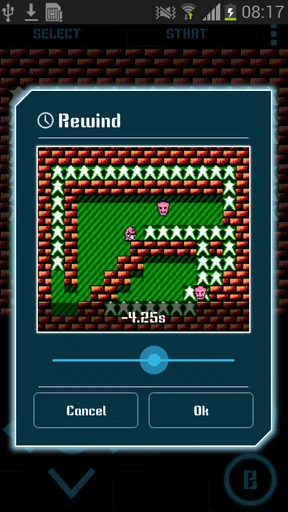
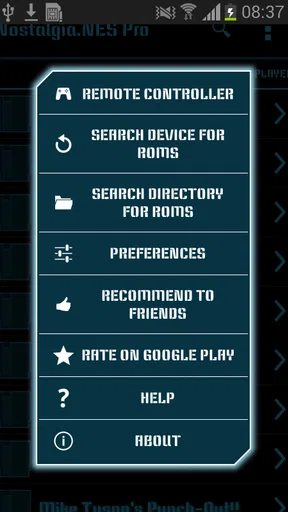
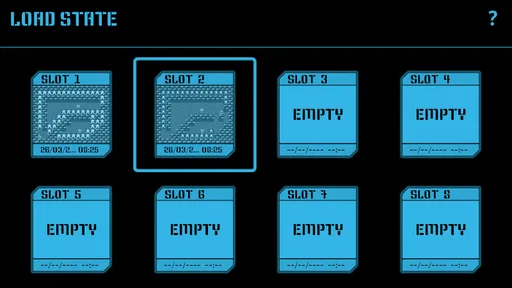
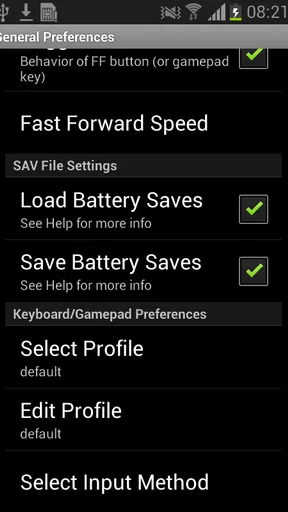
Our Review of NostalgiaNes Pro
 Analysis by Appyee
I approached NostalgiaNes Pro as a practical way to revisit classic NES software on a modern Android device, rather than as a new arcade game with its own original campaign. That distinction matters immediately: the application is an emulator, so the quality of the experience depends on how comfortably it lets you play games you already own or are legally entitled to use. Nostalgia Emulators has focused this release on that straightforward purpose, and the result feels more like a carefully arranged doorway into older games than a busy entertainment hub.
My first impression was positive because the app keeps attention on the screen and the controller instead of surrounding the experience with unnecessary decoration. The store summary calls it a high-quality emulator, but what matters in daily use is whether it makes older games feel natural on a touchscreen. I found the appeal strongest when I wanted a short session: launch the emulator, choose a title, and settle into a familiar rhythm without having to learn a new game system.
It belongs to the arcade side of mobile gaming, although its role is different from an ordinary score-chasing arcade release. You are not downloading one self-contained game with a fixed set of levels. You are using an emulator to play compatible NES software, which means the app is best understood as a tool for preserving the feel of a whole era. That makes it especially interesting for people who value compact stages, direct controls, memorable sound effects, and games that communicate their rules without long tutorials.
Why the presentation works for classic NES play
The application is listed at $4.99, and that price changes how I judge it. I do not expect a free trial full of interruptions or a modern live-service layer. I expect a focused utility that earns its place on my phone through reliability and convenience. For someone who already has a personal collection of legally backed-up NES games, paying once for a dedicated emulator can make more sense than moving between several less focused alternatives.
Nostalgia Emulators released the game on Jun 26, 2013, and the current version is 2.5.6. It supports Android devices beginning with version 5.0, so it is aimed at a broad range of phones and tablets rather than only recent hardware. The long presence of the app helps explain why it has accumulated over 50 thousand installs, while its average rating of 3.7 from around 3.3 thousand ratings suggests a useful but not universally perfect experience.
I would not read that rating as a simple verdict on emulation quality. Emulator satisfaction varies sharply with the phone, the controller, the game being played, and the user's expectations. A person seeking a faithful NES-style session may be pleased, while someone expecting a polished modern interface, effortless file management, or console-perfect convenience may notice rough edges quickly. The important question is whether its particular balance suits your way of playing.
A visual language built around restraint
The visual character of an emulator is easy to overlook because the games provide most of the art. Here, that restraint is appropriate. The application does not need to compete with the pixel art, limited palettes, and sharply defined sprites that make NES software readable. A good emulator should frame those images without making them feel like content inside a generic phone app, and this one is most convincing when it stays out of the way.
That matters for setting. NES games often establish a world with only a handful of visual signals: a repeating background, a distinctive enemy shape, a few colors, and a recognizable interface. Because those details are so economical, stretching or obscuring them can damage the mood. I recommend beginning with the default display arrangement, then making small adjustments only if the image feels uncomfortable on your device. Over-processing a simple pixel image can make it softer rather than more authentic.
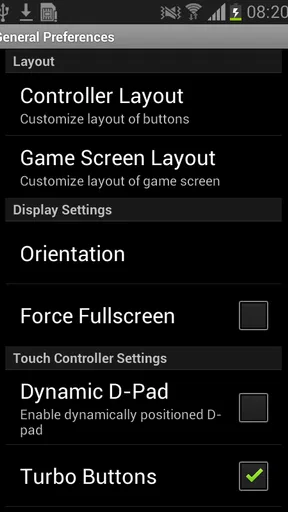
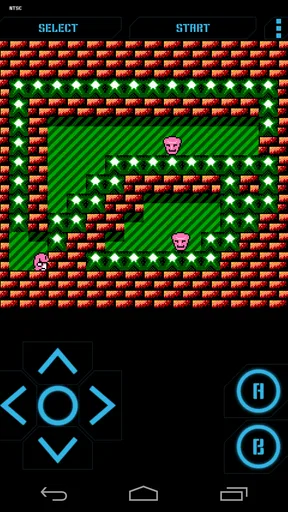
Screen size also changes the experience. On a phone held vertically, the game area and controls compete for space, and the result can feel cramped during fast platforming or action sequences. A tablet gives the image more breathing room, while a landscape orientation can make the controls easier to separate from the playfield. This is not merely a comfort preference: when the screen is crowded, missed inputs can feel like game difficulty even when the original software was not responsible.
One useful habit is to judge the emulator with several kinds of NES software rather than one favorite title. A slow puzzle game reveals whether the image is comfortable to study. A fast action game exposes control friction. A scrolling adventure highlights how the picture holds together during movement. This broader test gives a more honest impression than checking only a title that already feels easy to play.
Sound carries more of the mood than the graphics
Classic NES sound is not background decoration. Its short melodies, abrupt effects, and repeated patterns often tell me how a game wants to be played. A bright, quick loop can encourage experimentation, while a sparse soundscape can make a simple corridor feel tense. The emulator's job is to preserve that relationship between image, input, and sound so that the game remains rhythmically coherent.
I especially notice audio during longer sessions. On a brief break, I may tolerate a slightly imperfect balance because I am focused on reaching the next screen. During a full evening, however, harsh volume or an uncomfortable speaker setup can become tiring. I prefer to lower the device volume before adjusting the game itself, and headphones can help when the phone's speaker makes the older sound channels feel too sharp.
Sound also gives useful feedback when playing with touch controls. A jump, hit, menu movement, or item pickup can confirm that an input registered even when a finger partly covers the screen. That is one reason I would not mute the app immediately. For games built around timing, audio feedback can help compensate for the less precise physical sensation of a touchscreen, although it cannot completely replace real buttons.
The strongest atmosphere appears when the emulator is paired with software whose pacing depends on repetition. A familiar melody returning after a failed attempt can make retrying feel purposeful rather than merely frustrating. In that sense, the app's success is not about adding its own mood; it allows the original games' sound and timing to remain the emotional center.
Where the controls fit, and where they do not
Touch controls are the central trade-off. A virtual directional pad and on-screen buttons can reproduce the layout of an old controller, but they cannot reproduce the resistance, separation, and tactile certainty of physical buttons. I can enjoy slower games this way, especially when the action is forgiving. Fast platformers, fighting games, and titles that demand diagonal movement are more demanding because my thumb has no physical edge to feel.
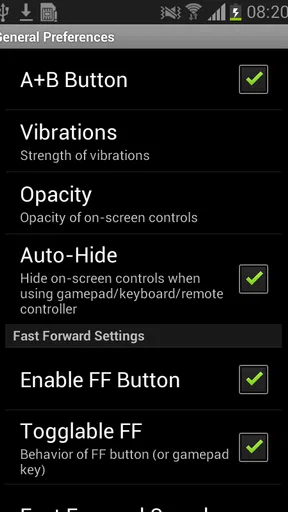
My practical advice is to treat the first session as a setup test rather than a serious playthrough. Check whether your hand covers important parts of the screen, whether the button spacing suits your grip, and whether your preferred orientation leaves enough room for the game image. If a title feels unfair, try changing your posture before blaming the emulation. Holding the phone with both hands and using short, deliberate presses usually works better than trying to play one-handed.
A physical gamepad is the better choice for anyone who plans to play regularly. It reduces accidental presses, makes repeated directional inputs more consistent, and lets the screen remain dedicated to the original picture. The emulator becomes much more convincing with that arrangement because the old games were designed around tactile controls. Touch remains useful for travel or a quick session, but it is not the ideal solution for every genre.
There is also a subtle difference between playing from a chair and playing while moving around. At home, I can hold the phone steadily and accept the limitations of the virtual buttons. On a train or in a waiting room, small shifts in grip can produce missed commands. For that reason, I see the app as excellent for compact, deliberate sessions and less suitable for demanding play when I cannot keep the device stable.
Using the emulator as part of an everyday routine
A realistic use case is a short evening break after work. I might choose a game with compact stages, play until I reach a natural stopping point, and put the phone away without entering a daily reward system or waiting for a download. That simple rhythm is one of the app's strongest qualities. It suits people who want games with clear beginnings and endings instead of an endless feed.
Another useful workflow is to create a small personal rotation rather than loading every possible title at once. Keeping a few legally sourced games ready makes the library easier to navigate and encourages me to finish something instead of browsing indefinitely. I would separate games by mood: one for relaxed puzzle solving, one for quick action, and one for longer exploration. This turns the emulator into a compact retro shelf rather than a cluttered archive.
File handling is an area where users should be realistic. The application is not a substitute for owning the games, and I would only use ROM files obtained from sources I am legally allowed to use. Before paying, I would also make sure I understand how I will move those files onto the device and where I want them stored. The emulator can be the convenient part of the arrangement, but organizing a personal collection still requires care.
That preparation is especially important for someone who changes phones often. A retro library is only convenient if the user knows where the files and any personal progress are kept. I recommend testing one game first, confirming that the full launch-and-play routine feels comfortable, and only then investing time in organizing more titles. This avoids building a large collection around a control layout or workflow that does not suit you.
How it compares with other ways to play NES games
Compared with a general-purpose emulator, NostalgiaNes Pro feels more appealing to someone who wants an app centered specifically on NES-era play rather than a tool covering many systems. A multi-system alternative may offer broader flexibility, but that breadth can bring more menus, more settings, and a less focused identity. If your interest stops at NES software, a dedicated application is easier to understand and more aligned with the original hardware's character.
Compared with official retro collections, the trade-off is different. An official collection may provide legally packaged games and a more curated presentation, while an emulator gives you more control over your own library. The emulator route is attractive when you already have legitimate backups and want one place to use them. It is less attractive if you want everything prepared for you with no file-management decisions.
Compared with playing on original hardware, the phone wins on portability and convenience but loses the physical feel of the controller and the certainty of a television-sized display. A dedicated retro console can offer a more authentic living-room experience. NostalgiaNes Pro makes more sense when the priority is carrying a personal NES setup in a pocket, accepting that the phone itself becomes part of the compromise.
There is also a difference between this app and modern mobile arcade games. Newer arcade titles often depend on rapid rewards, unlocks, touch gestures, or constant visual stimulation. NES games usually ask for attention to patterns and timing instead. I find that contrast refreshing, but users who want contemporary progression systems or competitive online features should look elsewhere. This is a tool for playing older design, not a replacement for a current arcade service.
Who will enjoy it, and who should skip it
I would recommend it to retro players who already understand the legal side of using game files, people who prefer short repeatable sessions, and Android users who want a focused NES experience rather than a large multi-system dashboard. It is also a good fit for anyone curious about how older games create atmosphere with minimal art, compact sound, and direct rules. The Everyone age rating makes it suitable for a broad audience, although the difficulty of individual games can still vary considerably.
I would skip it if you want a ready-made catalog, a modern tutorial-driven game, or controls that feel exactly like a physical controller without additional hardware. I would also hesitate if your main interest is intense action played one-handed. In that situation, a game designed specifically for touch or a handheld device with built-in buttons will probably be more comfortable.
The price is reasonable for a person who will use the emulator repeatedly, but it is harder to justify for casual curiosity. Paying once does not automatically make every part of retro gaming effortless; the value comes from returning to the app over time. If you only plan to play one brief session, a legally packaged collection or an existing console may be a better match.
My verdict on the complete atmosphere
What I like most is the coherence between the app's modest presentation and the games it is meant to preserve. The visual restraint leaves room for pixel art, the sound remains tied to timing and feedback, and the pacing comes from the original software rather than from notifications or reward loops. When the controls fit the game and the phone is held comfortably, the experience can feel surprisingly intimate: a small screen carrying an entire design language from another era.
The limitations are equally clear. Touch input cannot fully reproduce a controller, setup depends on having legally usable game files, and the overall experience changes with the Android device and the title being played. Its 614 reviews show that many people have taken the time to assess it, but the average rating of 3.7 is a useful reminder to keep expectations measured rather than assuming perfection.
For me, NostalgiaNes Pro works best as a quiet, focused arcade companion. I would pair it with a physical controller for demanding games, use headphones when the sound needs more definition, and test the display with several genres before settling on a long-term setup. If that sounds like the kind of small ritual you want from mobile gaming, this paid release from Nostalgia Emulators is worth considering. If you want frictionless modern convenience, another option will likely serve you better.
Verdict
Strengths of NostalgiaNes Pro
- Accurate NES emulation with responsive controls and stable gameplay.
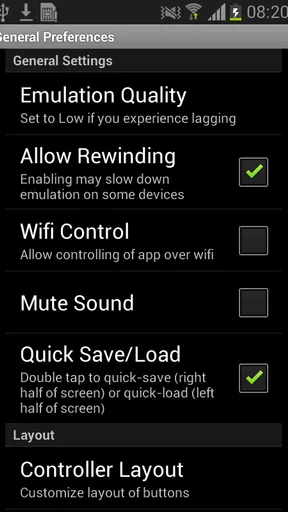
- Supports save states, making it easy to resume games anytime.
- Customizable on-screen buttons improve comfort on touchscreens.
- Works smoothly on many older Android devices.
- Includes useful display options for a more authentic retro look.
Limitations of NostalgiaNes Pro
- Game ROMs are not included and must be obtained legally by the user.
- Touch controls can feel imprecise during fast-paced platform games.
- Some features may require navigating an older-looking interface.
- Limited appeal if you do not already own compatible NES game files.
- Performance and compatibility can vary between different devices.
Other Releases by Nostalgia Emulators
View All
Nostalgia.GBA Pro (GBA Emulato
Arcade4.2
Similar Picks in This Category
View All
Subway Surfers
SYBO Games4.6

Stickman Party 234 MiniGames
PlayMax Game Studio4.6

Subway Princess Runner
Ivy4.4

Temple Run
Imangi Studios4.2

Zombie Tsunami
Mobigame SAS4.6

Stack Ball - Crash Platforms
CASUAL AZUR GAMES4.5
Frequently Asked Questions
What is NostalgiaNes Pro?
NostalgiaNes Pro is an Android emulator designed to run games originally released for the Nintendo Entertainment System. After testing its main menus and gameplay tools, I found that it focuses on classic-console emulation, with options such as save states, controller support, customizable controls, and display settings. It does not include copyrighted games, so users generally need to provide legally obtained ROM files themselves.
Does NostalgiaNes Pro include NES games?
No, NostalgiaNes Pro does not normally provide a built-in library of NES games. The application is an emulator, meaning it supplies the software environment needed to play compatible game files. Before downloading, users should understand that they are responsible for obtaining ROMs legally and should check the copyright laws applicable in their country. The app itself should not be treated as a source of free game downloads.
What features does NostalgiaNes Pro offer?
NostalgiaNes Pro is aimed at players who want more flexibility than a basic emulator. Depending on the device and version, its useful features may include save and load states, automatic game scanning, configurable on-screen controls, external gamepad compatibility, screen orientation options, and visual adjustments. In testing, these tools make short sessions convenient, although the exact experience can vary according to the phone, Android version, and game file quality.
Can I use a physical controller with NostalgiaNes Pro?
NostalgiaNes Pro may support external controllers through compatible Bluetooth or USB connections, which can make platform games feel much closer to the original console experience. However, controller compatibility is not identical across all phones, tablets, and gamepads. You may need to pair the device manually and assign buttons inside the emulator settings. If no controller is available, the customizable touchscreen controls remain the primary alternative.
Is NostalgiaNes Pro safe and worth downloading?
NostalgiaNes Pro can be worth considering if you want a focused way to play legally obtained NES titles on an Android device, especially if save states and controller support matter to you. Before installing, download it from a reputable source and review the permissions, advertisements, pricing, and recent user feedback. Emulator performance is usually modest in its hardware requirements, but results can still vary between devices and software versions.
Play our best games!


